Conferfly Extension - A Multifunctional Browser Add-on
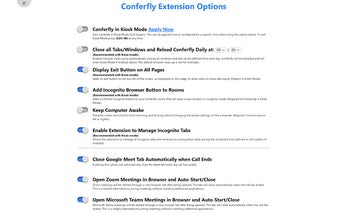
This is an extension for Confifer which allows you to apply a full screen mode, set the time for cleanup, and a few other useful things.
Top Recommended Alternative

The full screen mode for Confifer is what you can expect from a kiosk and you won't need to leave your room even if you don't have anything going on.
The browser clean up options can be applied through the configuration options of Confifer.
For example, in the Settings, you can go to the Confifer and click the Advanced settings tab, then you will have an option called Clean up browser.
Then you can choose to have the default browser cleanup which will run at midnight every day, or you can choose to set a specific time.
You can add an exit button to the top left of the screen to close tabs easily.
Another thing to note is that Confifer will automatically enter full screen mode when you go into the room.
In order to avoid screen dimming or locking, you will need to change the power settings of your computer.
This feature can be enabled in the advanced settings of Confifer.
This is helpful for those who are using a screen in front of a television.
This is a useful alternative to joining meetings without installing additional applications.
This is helpful for those who are not very familiar with how meetings work.
This will open a new tab for each meeting that is started.
Conferfly's meetings will be started through a new browser tab after being opened.